AI Circuit Builder
The AI builder is a bottom-docked panel where you describe a circuit in plain English and get a real, wired, simulation-proven design to place on the desk. It uses your own AI connection — your key, your provider, your account — and Chip Hippo contacts no AI provider until you've set one up and asked it for something.
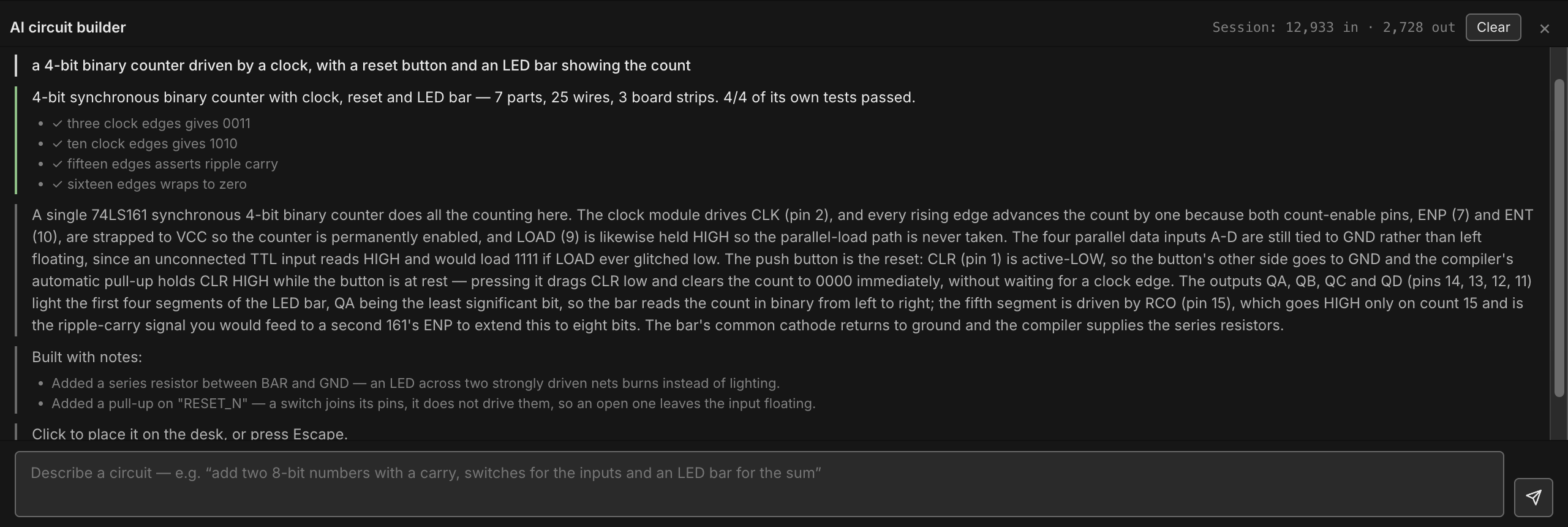
The important thing to understand about it is what the model is and isn't allowed to decide. It never places a chip, never picks a hole, and never draws a wire. It answers one question — which parts, and which of their pins are joined? — and Chip Hippo's own compiler does all the geometry, then proves the result by running it through the same simulation engine the Run button uses. Nothing that fails is ever offered to you.
Setting up a connection
Open Settings (Cmd/Ctrl+,) and pick the AI tab. There are four
things there:
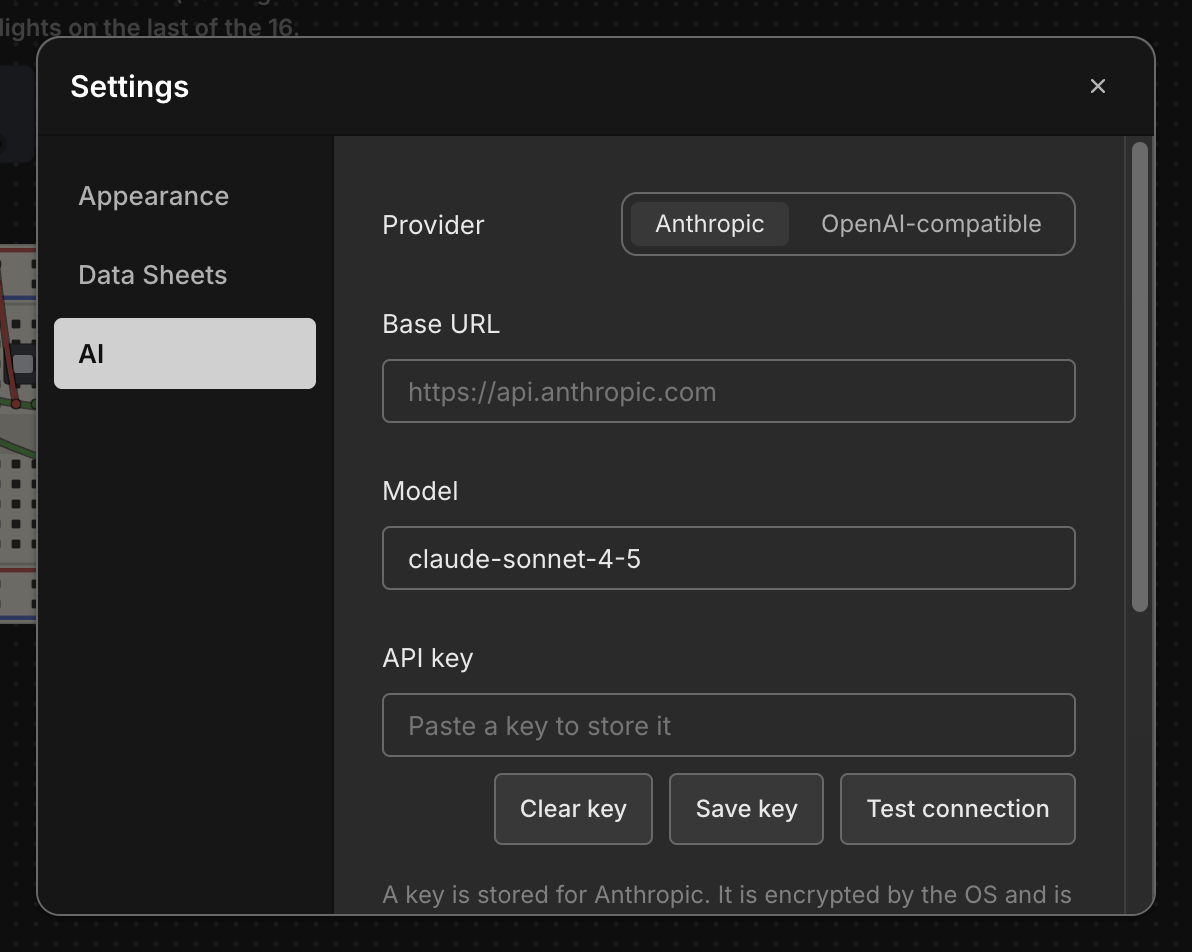
- Provider — Anthropic, or OpenAI-compatible. The second is deliberately not "OpenAI": the same request format is what Ollama, LM Studio, OpenRouter and vLLM all speak, so one setting plus a base URL covers every local and hosted endpoint worth using.
- Base URL — leave blank to use the provider's own default (shown as the
field's placeholder). It must be https — except plain http to this
computer (
localhost,127.x.x.x,::1), sohttp://localhost:11434works for a local Ollama or LM Studio. Plain http to another machine is refused, because your key travels in the request and would cross the network unencrypted. Any other https address — a proxy, OpenRouter — is allowed, but your key goes there too, so Settings shows a note beside the field naming the host whenever it isn't Anthropic's or OpenAI's own API or this computer. Use one only if you trust it. - Model — also blank for the default. Any model id your endpoint accepts.
- API key — paste it and click Save key.
Your key is never stored in Chip Hippo's settings file. It goes straight to your operating system's own secure credential store (Keychain on macOS, the Credential Manager on Windows, the desktop keyring on Linux), encrypted, and it is never read back into the app's window afterwards — the panel only ever learns whether a key is configured, not what it is. If your system has no secure store available, Chip Hippo refuses to save the key and tells you so, rather than quietly writing it to disk in the clear.
Click Test connection to check the base URL, key and model in one small request before you rely on them. Clear key forgets the stored key.
A local server that needs no key at all works fine — leave the key blank and just set the base URL.
Asking for a circuit
Click the AI builder button in the toolbar to dock the panel along the
bottom of the window (drag its top edge to resize it; it remembers whether it
was open and how tall you left it). Type a description and press Enter —
Shift+Enter gives you a newline for a longer brief.
The toolbar button is disabled until there's a connection to ask — no key stored, a base URL that doesn't parse, or one that is plain http to another machine — and it greys out with the reason as its tooltip. It's the one tool in Chip Hippo that can't work on your own machine alone, so the button says so rather than failing after you press it. (Whether the server will actually accept your key is only the server's to say — that's what Test connection above is for.)
Descriptions that work well are the ones an engineer would accept:
add two 8-bit numbers together with a carry, switches for the inputs and an LED bar for the sum
a 4-bit counter driven by a clock, showing its count on an LED bar
Be specific about the inputs and the outputs — what you want to set, and what you want to see. Say which logic family you want if it matters: mention CD4000, 4000-series or CMOS and the design uses only CD4000 parts; mention TTL or 74LS and it uses only 74LS parts; say neither and it uses 74LS. It won't mix the two unless you ask, and if you do it adds the pull-up a 74LS output needs to drive a CMOS input. The parts themselves you can leave to it: the model is told, on every request, exactly which chips are in Chip Hippo's catalog and exactly what every pin on each of them is called, so it has no reason to invent a part that doesn't exist.
You don't need to mention power, and you shouldn't. Every chip declares its own VCC and GND pins, so the compiler wires power itself, plants a 5 V supply, and bridges the breadboard's two power rails. You also don't need to ask for a series resistor on an LED — see below — or for the spare gates of a CD4000 chip to be tied off: a floating CMOS input reads neither HIGH nor LOW, so the compiler ties every input of an unused CMOS gate to GND itself.
While it's working the panel shows progress; the same button becomes a cancel, so a long or expensive request is always interruptible.
What happens to the answer
Before you are shown anything at all, the answer is put through a ladder of checks. Each one exists because of a specific way a machine-generated circuit goes wrong while still looking perfectly fine:
- It compiles. Parts get real seats on real breadboard columns, with an allocator that makes it impossible for two parts to accidentally share a column-half — which on a real breadboard means they're shorted together. Before that, the netlist is held to the electrical rules a simulation would happily let through: no output wired straight to a power rail (the supply silently wins), and no two outputs on one net unless every one of them can be switched off — a tri-state bus.
- Everything seated. No part hangs off the end of a board with pins over nothing. A part like that loads without complaint and is electrically dead.
- The nets match. The connections the design asked for are compared against the connections the finished breadboard actually has. This is the check that catches an accidental short, which is otherwise invisible — the circuit loads clean and simulates happily while computing something else.
- It powers up and settles. Every chip reports OK, with no conflicts, no shorts, no oscillation, and no LED burning out.
- Nothing is left floating. A signal net nothing drives is reported rather than shipped — and so is an input the design uses but never connects, such as a decoder's enable, which would otherwise quietly read HIGH. (The spare gates of a TTL chip it only half uses may float; a CMOS chip's spare gates are tied off by the compiler.)
- Its own tests pass. This is the interesting one. The design is asked to state its own acceptance tests — "with these switches set this way, after this many clock edges, these LEDs should read this" — and Chip Hippo runs them. It's the only check that tests what the circuit means rather than whether it's internally consistent, and it's what catches a perfectly-built adder with its bit order reversed. A design must bring at least two, each with different inputs; every test starts from the circuit as built and must spell out every switch position and every segment it reads; and each test's state is checked for shorts and fights too, not just for the lamps it names.
The panel reports which tests ran and whether they passed as part of the summary.
Placing what you get
A design that passes is armed as a placement ghost — the whole circuit
follows your cursor, snaps against boards already on the desk, and turns red
where it won't fit. Click to place it, or press Escape to discard it. A
circuit you positioned yourself is a great deal easier to trust than one that
simply appears.
However large it is, placing it is one undo step: Cmd/Ctrl+Z removes the
entire thing — boards, chips, wires and all — in one go.
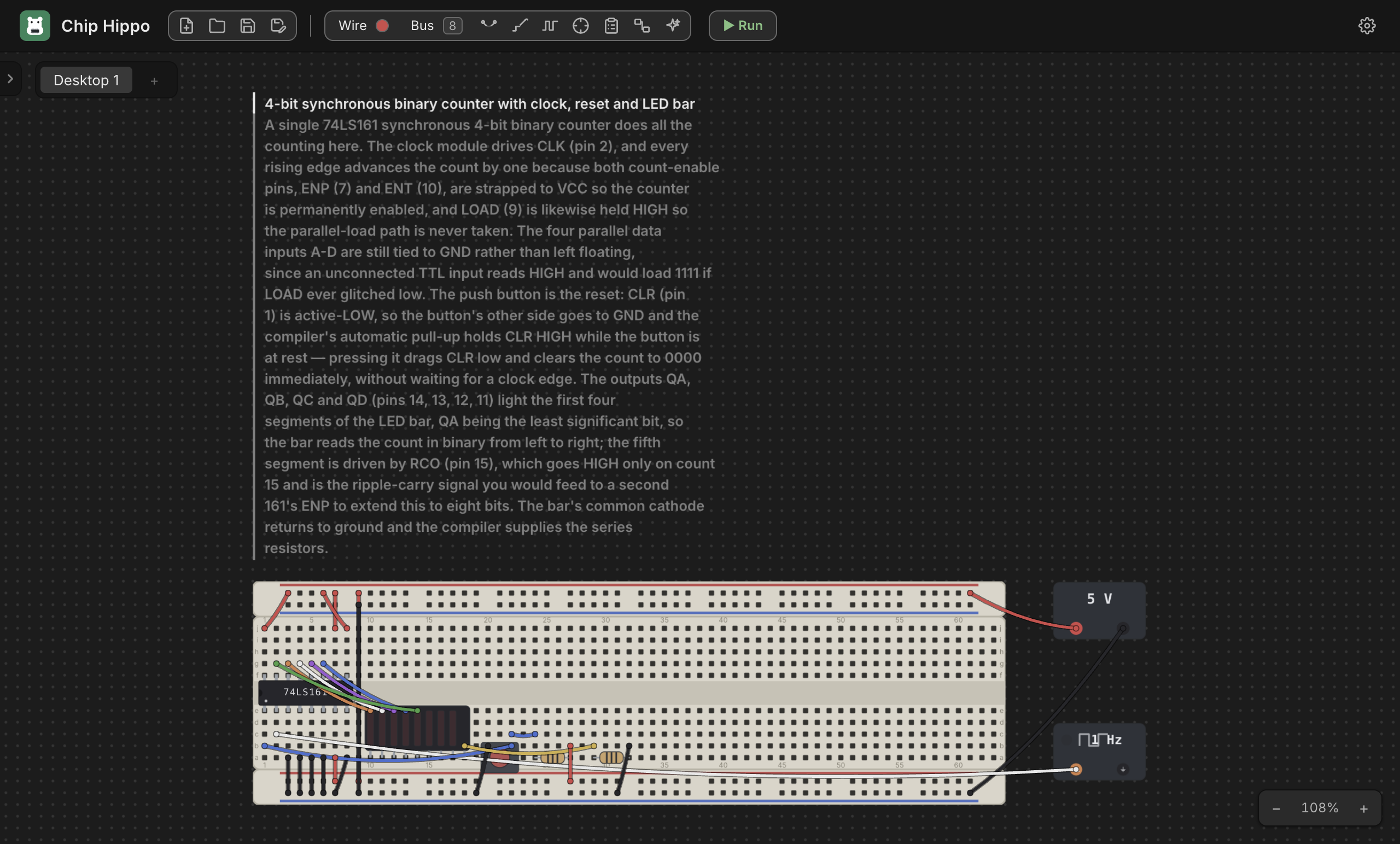
Every generated circuit explains itself. The description above is stamped on the desk as a caption over the boards, in the design's own words: which chip does the work, why each tie-off is where it is, and what the compiler added on your behalf. You didn't build it and can't ask it why it's wired the way it is — so it says so up front. The caption is an ordinary annotation anchored to the design, so it travels with it, and you can edit or delete it like any other note.
When it doesn't work
Two very different things can go wrong, and the panel distinguishes them.
The design was wrong. A pin named that doesn't exist, an input left floating, an output shared with another output, a test that fails. These go back to the model as a precise list of what failed — not as prose — and it gets up to two attempts to fix them. If it still can't, the panel lists what's still wrong and stops rather than looping at your expense.
Chip Hippo was wrong. If the design was described correctly but the compiler couldn't build it, the panel says so plainly and doesn't send it back — re-asking would only spend your tokens on a fault the model has no way to influence.
A few things are outside what a netlist can express, and it will tell you rather than guess:
- Memory contents. A ROM, EPROM or EEPROM in a generated design arrives unprogrammed — a netlist has nowhere to carry its bytes. The panel says so when it offers the design; load the image through the chip's Properties before you run it.
- Multi-corner cans — the oscillator packages. The model isn't offered them.
- Capacitors and the timers (the 555, CD4047B, CD4060B, CD4098B, CD4528B, CD4538B, CD4541B). A timer's rate lives in the values of its resistors and capacitor, and a netlist has nowhere to state a value, so the model isn't offered them. Build a timer by hand and wire the rest with the builder, or ask for a circuit clocked by a clock brick.
- Transistors, diodes, inductors and the potentiometer, and the CD4007UB's bare MOSFETs with them. What these do depends on how they are wired, which way round they go, or where a knob is turned — none of which a netlist can say — so the model isn't offered them either.
Review: asking what's wrong with a circuit
The panel has two modes, picked with the Build / Review switch in its header. Everything above is Build. Review turns the panel around: it reads the desktop you already have, runs Chip Hippo's own checks over it, and explains what it found.
Type a question and press Enter — or just press Enter with the box empty,
which asks "what is wrong with this circuit?".
Chip Hippo finds the faults; the model explains them. This is the same division of labour that keeps Build honest. The app derives every finding itself, from the real netlist and a real settle of the exact circuit on your desk — the model is never asked to read a wiring list and decide whether something is shorted, because a wrong answer to that would be indistinguishable from a right one. What it is good at is the sentence afterwards: what a fault means for your design, which one to fix first, and what to do about it.
The checks it runs are the ones that leave a circuit looking perfectly wired and quietly not working:
- Nothing is powered — no supply on the desk, a chip whose power pins go nowhere, or one whose VCC net never reaches a rail.
- An input nothing drives. The most convincing lie a real circuit tells: a floating TTL input reads HIGH, so the chip works, just not as designed. Only inputs that are actually in use are reported — an unused gate on a quad TTL package is idle, not broken. A CMOS input is different: it reads neither HIGH nor LOW, so every floating CD4000 input is reported, spare gates included.
- A part switched off. An active-low output enable left unwired reads HIGH, so the chip drives nothing at all while its wiring looks flawless.
- Two outputs on one net, whatever they happen to be driving today.
- Shorts, driver conflicts, and a circuit that won't settle, straight from the engine.
- A chip outside its supply range (a 74LS chip at 3 V or above 5 V), and an LED with nothing limiting its current.
- A family boundary — a 74LS output driving a CMOS input with no pull-up, too many 74LS inputs on one CMOS output, or two supply voltages on one net.
The findings appear in the transcript immediately, before the request even goes out — so if the connection fails you still have the app's own answer.
Review never changes anything. No part is placed, no wire is moved, and there is nothing to undo afterwards. That's also why it's the one thing here that works while the simulation is running: a review can't be refused by a frozen desk, and a running circuit is often exactly when you want to ask what it's doing.
Switching between Build and Review starts a fresh conversation — the two ask the model quite different things — but your transcript stays where it is.
LEDs and resistors
You never need to ask for a current-limiting resistor, and you shouldn't put one in your description. Chip Hippo models the physical requirement, not just the logical one: an LED conducting between two strongly-driven nets burns out instead of lighting, exactly as it would on a real bench. So whenever a lamp leg goes straight to a power rail — a display's common leg, a single LED's cathode to GND or its anode to VCC, a segment of an isolated bar — the compiler interposes a series resistor for you (a resistor network, when a display or bar has several legs on a rail). A single LED gets a resistor of its own, plugged in the way you would on a bench: the resistor's top lead goes into the LED's column and its other lead straight into the power rail, so the LED, the resistor and the rail are joined by the breadboard itself, with no jumper wires between them. See Chips & Components for the same rule when you're wiring by hand.
Cost, privacy and the simulation
Requests go to whichever endpoint you configured, billed to your own account — Chip Hippo neither proxies them nor sees them. The parts catalog that makes up most of each request is sent in a form your provider can cache, so a repair attempt costs far less than the first ask.
The panel won't build while the simulation is running — press Stop first. A generated circuit is a document edit like any other, and the desk is frozen while the circuit runs. Review is exempt: it changes nothing, so there is nothing for a frozen desk to refuse.
A review sends a compact description of your circuit — the parts, which pins are joined, and the findings — but never the layout, and never anything about your project beyond the desktop you asked about.
See also
- Settings — the AI tab in full, alongside every other preference.
- Running a Simulation — the engine every generated circuit is proved against before you see it.
- Files, Saving & Undo — how a placed circuit is saved, and how one undo step removes it.